
Turn your WBS into
AI-executed work.
Define a weighted Work Breakdown Structure the way your team already tracks it. Let an AI agent propose a plan for each task, review it before anything runs, and review the pull request it opens — not the whole session.
- Weighted WBS progress
- Plans you approve first
- Pull-request delivery
- Documents & reports as PDF
The loop
How it works
Five steps, and the only two that need a human are quick ones.
-
1 You
Define the WBS
Break a project into weighted phases and tasks — nested to any depth.
-
2 AI
AI proposes a plan
The agent reads the task and the real codebase, then drafts an approach.
-
3 You
You approve it
A quick skim, not a full review — the cheapest checkpoint in the loop.
-
4 AI
AI executes
Runs unattended, tests its own work, and opens a pull request.
-
5 You
You review the PR
The only step where you read code line by line.
Documents
The paperwork writes itself from the project
URS, SRS, SDS, the project management plan and the monthly maintenance report are built from templates, numbered for you and issued as PDF — in the language of the project.
-
Numbering you never type
Headings, Rajah and Jadual captions, the contents page and the lists of figures and tables are generated, so a reordered section never leaves a wrong number behind.
-
Diagrams from a few lines
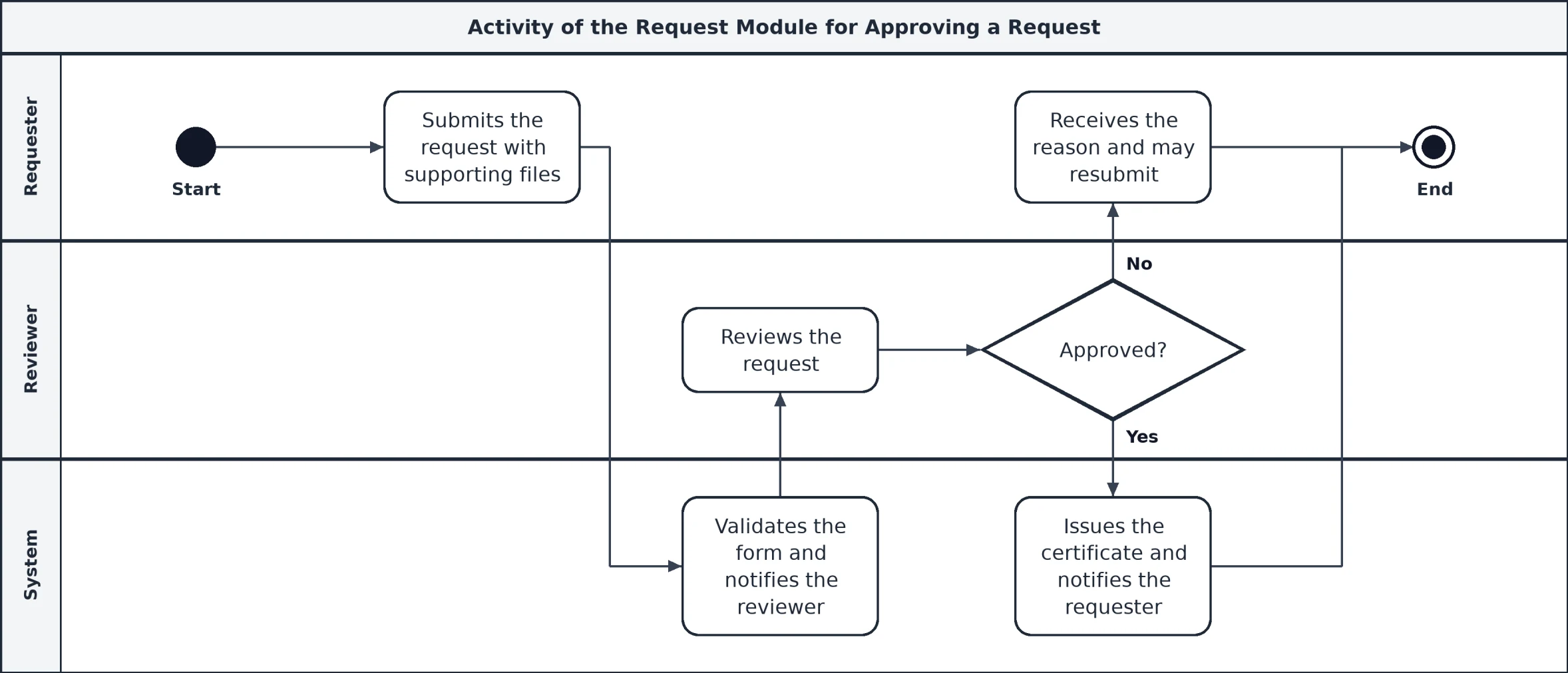
Activity swimlanes and use case diagrams are drawn from a short description — no drawing tool, and they redraw when the text changes.
-
Reports from your support tickets
The monthly corrective maintenance report is built from the ticket system on the day you choose, with the overdue tickets listed.
-
One place for every file
Generated documents and uploaded files sit together in nested project folders, with version history and sign-off tables.
Claude
Run the project by asking
Connect PM Studio to Claude and the WBS, the AI pipeline and the documents are a conversation away — from your desk or from your phone.
- Add a task, update its progress, or reorder the WBS.
- Ask for a plan, read it, approve it or discard it.
- Write a document section by section, validate it and issue the PDF.
- Every call is audited, and each person only sees the tools their role allows.
Features
Everything the WBS needs to actually run the project
Not a simplified version of how your team already tracks progress — the same methodology, made operational.
Weighted progress
Item and project weightage, planned vs. current %, and variance — rolled up automatically from every leaf task.
Plan before it runs
Every AI task starts as a reviewable plan, not a surprise diff.
Deterministic scheduling
Deadline, priority, budget, and reviewer capacity decide what runs next — no black-box AI scheduler.
A pool of runners
Register multiple machines; tasks dispatch to whichever is free and eligible for that project.
Documents as PDF
URS, SRS, SDS, project plans and reports — numbered, signed off, versioned and drawn with their own diagrams.
Support tickets, automated
Tickets from your service desk become tasks with an AI plan, and the month-end maintenance report builds itself.
Project memory
What past runs learned about a project is fed into every future task, so the agent stops repeating mistakes.
Mobile access via MCP
Add a task, check status, or reorder the WBS by asking Claude — from your phone.
Excel export
Exports as a drop-in replacement for the spreadsheet you already circulate — live formulas, not values.
FAQ
Questions teams ask first
Does the AI change my code on its own?
Not without you. Every task starts as a plan you approve, and by default the result arrives as a pull request on a branch. You decide what merges.
Where does the code actually run?
On the runner machines you register — they clone the repository, edit, test and push. PM Studio never needs to hold your source code itself.
Can the AI schedule itself into trouble?
No. What runs next is decided by deadline, priority, budget and reviewer capacity, not by a model, so the order is predictable and explainable.
Who can see what?
Roles decide which screens, tools and projects a person can reach. A role can be limited to the projects it is assigned to, and every tool call made through Claude is logged.
Can the documents follow our own format?
Yes. The templates mirror agency documents (cover, control and sign-off pages, numbered headings, tables and diagrams), and the project settings fill in agency, contract and signatories once for every document.
Your WBS, running the project instead of just describing it.
Log in to build the WBS. The AI agent takes it from there — and the documents follow.
Log in to your workspace